
 Fast Quote
Log in
Sign Up
Don't have an account? Sign Up
Already have an account? Log in




 Brand New In Stock
 Ships Today
 12 Months Kernfix Warranty
 Urgent Worldwide Shipping
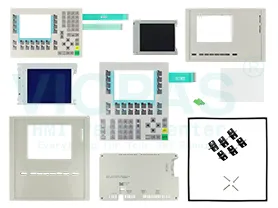
Suppy Keyboard and Plastic Case for Replacement
MTBF backlighting (at 25 °C): about 100,000 hours
Control elements: Membrane keyboard
Type of supply voltage DC
Siemens OP7 Interfaces: 1 x RS232, 1 x RS422, 1 x RS485 (max. 1.5 Mbit/s)
Simatic OP73 Interfaces/bus type: 1 x RS485 (max. 1.5 Mbit/s)
Siemens OP77B/A Interfaces: 1 x RS232, 1 x RS422, 1 x RS485 (max. 12 Mbit/s)
SalesDeep Suppy Simens Simatic HMI Parts Catalog
How do I to transfer Siemens OP7 with mode or back up project?
When you use the buttons ESC + Cursor Right + Cursor Down and at the same time switch on the Power,
you will go to Transfer mode, but also delete the project on panel
When you use the buttons ESC + Cursor UP and at the same time switch on the power,
you will go to Transfer mode and the project will stay on the panel.
So you can use Prosave software to back up Siemens OP7 project.
Please have a look in manual: OP7, OP17 Operator Panel See chapter 3.1 (page 3-5).
 Fast Quote
 Worldwide Shipping
 12 Months Warranty
 Customize Service