
 Fast Quote
Log in
Sign Up
Don't have an account? Sign Up
Already have an account? Log in




 Brand New In Stock
 Ships Today
 12 Months Kernfix Warranty
 Urgent Worldwide Shipping
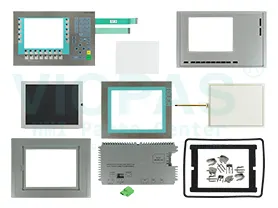
Supply Touchscreen, Protective Film, Membrane Keypad and LCD Display for Simatic Multi Panel Replacement
MTBF backlighting (at 25 °C): about 50000 h
Control elements: Keys and Touch
Type of supply voltage DC
Design of display: TFT display, 65536 colors, 1 024 Pixel x 768 Pixel
SalesDeep Suppy Simens Simatic HMI Parts Catalog
How to maintenance and care Siemens Simatic Multi Panel HMI?
The HMI device is designed for maintenance-free operation. The touch screen and keyboard membrane should nevertheless be cleaned regularly.
CAUTION Inadvertent operation
Always switch off the HMI device before cleaning it. This will ensure that you do not trigger functions unintentionally when you touch the keys.
Requirements
Use a cleaning cloth dampened with a cleaning agent to clean the equipment. Only use water with a little liquid soap or a screen cleaning foam.
CAUTION
Do not clean the HMI device with compressed air or steam jet blowers. Never useaggressive solvents or scouring powder.
Proceed as follows:
1. Switch off the HMI device.
2. Spray the cleaning solution onto a cleaning cloth.
Do not spray directly onto the HMI device.
3. Clean the HMI device.
When cleaning the display wipe from the screen edge inwards.
 Fast Quote
 Worldwide Shipping
 12 Months Warranty
 Customize Service