
 Fast Quote
Log in
Sign Up
Don't have an account? Sign Up
Already have an account? Log in




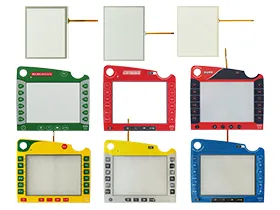
 Brand New In Stock
 Ships Today
 12 Months Kernfix Warranty
 Urgent Worldwide Shipping
Anti-Glare Touch Layer: Matte finish reduces reflections, ensuring visibility in direct sunlight or bright indoor settings.
Customizable Soft Key Layouts: Programmable silicone keypads adapt to different implement control workflows.
Field-Programmable Firmware: Update control logic via USB/SD card without disassembling the terminal.
Self-Cleaning Screen Coating: Repels dust, mud, and fingerprints, reducing manual cleaning frequency.
Backlit Legends: Glow-in-the-dark labels enable nighttime operation in low-light conditions.
Quick Troubleshooting Tips for ISOBUS Terminal Accessories
1. Touchscreen Not Responding:
Verify all cable connections are secure and correctly installed.
Power cycle the terminal to restore touch functionality.
2. Display Issues (Flickering or No Image):
Check cables and confirm device compatibility.
Replace the display module if problems continue.
3. Buttons or Keypad Unresponsive:
Inspect keypad connections and clean any debris.
Replace the membrane keypad if physically damaged.
4. Calibration or Touch Accuracy Problems:
Recalibrate touchscreen via system settings.
Avoid using sharp objects on the screen to prevent damage.
For further assistance, contact SalesDeep.
 Fast Quote
 Worldwide Shipping
 12 Months Warranty
 Customize Service