
 Fast Quote
Log in
Sign Up
Don't have an account? Sign Up
Already have an account? Log in




 Brand New In Stock
 Ships Today
 12 Months Kernfix Warranty
 Urgent Worldwide Shipping
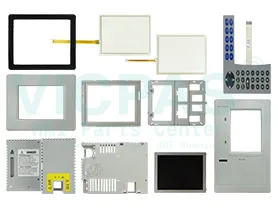
Suppy Touchscreen, Keyboard, and LCD Display for PanelView Plus 600 Terminals Replacement
Touch screen Technology: analog resistive
Display Size: 5.7 in
Display Color: Amber
Software: PanelBuilder (Configuration and Development)
Input Type:Touchscreen & Keypad
Input Power:90-130 Volts Alternating Current
How to install the Allen Bradley PanelView Plus 600 terminals in a panel?
1. Cut an opening in the panel by using the panel cutout shippedwith the terminal.2. If a communication module is ordered separately, attach themodule to the base unit before panel installation.
Refer to the instructions shipped with module.
3. Make sure the terminal sealing gasket is properly positioned onthe terminal.
4. Install legend strips before installing the terminal if you areusing keypad legend strips on a 600 keypad terminal.
Be careful not to pinch legend strip during installation.
5. Place the terminal in the panel cutout.If installing the terminal in an existing 550 panel cutout, alignthe terminal with the center of the cutout for best gasket sealing.
6. Insert all mounting levers into the mounting slots on theterminal.
7. When all levers are in place, slide each lever an additional notchor two until you hear a click.
8. Rotate each lever in the direction indicated until it is in the finallatch position.
 Fast Quote
 Worldwide Shipping
 12 Months Warranty
 Customize Service