Touchscreen-Keypad-Display-Case & More Search 80000 Inventory
user photo
Account
Login
Cart
0
HOME / All / B&R Power Panel/ Power Panel 65

Power Panel 65

  • Series overview
  • More information
  • Select by specs
  • Troubleshooting
  • Power Panel 65
    Brand New In StockShips Today

    12 Months Kernfix Warranty

    Urgent Worldwide Shipping

    The PP65 is both a controller and an operator panel. Any necessary peripherals can be connected using the integrated X2X interface. Using the optional interface modules, it is also possible to connect other B&R products or even to integrate the PP65 into control systems from other manufacturers. All components are situated in a compact housing with a 3.5" or 5.7" QVGA TFT display.The PP65 is equipped with a powerful Geode LX800 processor with 500 MHz clock frequency. With this computing power, the PP65 provides performance that was previously only achieved by the PP400. The PP65 is therefore especially suitable for multi-axis applications that require lots of computing power but only have limited space in the control cabinet. The compact dimensions of the PP45 have been taken over in this case.
  • In Stock
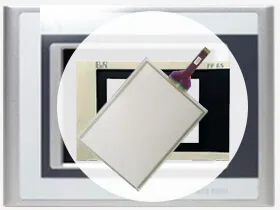
    • Suppy Touchscreen, Keyboard and Protective Film for Power Panel 65 Replacement Repair

    • Touch screen Technology: analog resistive

    • More screen options including 4-in., 5-in. and 10-in. terminals.
    • Widescreen option on three sizes: 4-in., 5-in., and 10-in. terminals.

    • Serial and Ethernet communication only.

    • Preferred HMI for CompactLogix controllers.


  • Display Size
    • 12.1''
    • 10.4''
    • 6.5''
    • 5.7''
    • 15''
    • 3.5''
    • 8.4''
    • 10.1''
    • 17''
    • 19''
    • 22''
    • 18.1''
    • 7''
    • 4.3''
    • 9''
    • 24''
    Touch Operation
    • Analog-Resistive
    • Matrix
    • Capacitive
    Product Type
    • Touchscreen
    • Keypad
    • Display
    • Touchscreen Overlay
    • Touchscreen Keypad
    Display Color
    • Color
    • Monochrome
  • The B&R Power Panel 65 Terminals Touch Screen Issues:


    Improper calibration
    Check for activation points that are offset from touch points.Calibrate the touch screen.

    Non-functioning touch screen
    Check the touch screen for damage, such as cuts or excessive wear.If there is damage, replace the terminal.

    Touching multipleinput elements
    Application screens contain graphic input elements that areconfigured in the Machine Edition application. When touched,these elements perform operations in a predictable manner. Forexample, an input element is configured to navigate to a specificscreen in the application or start a motor when touched.

    Multiple operations cannot be conducted simultaneously. Doing soresults in an unintended operation.
    • Do not touch multiple input element simultaneously.
    • Do not rest a hand or multiple finger on the display.

search:
Do you want to quickly know the product quotation you need?
  • Fast QuoteFast Quote
  • Worldwide ShippingWorldwide Shipping
  • 12 Months Warranty12 Months Warranty
  • Customize ServiceCustomize Service
KEEP IN TOUCH
Please send your message to us
*Email
Mobile Phone
*Title
*Content