
 Fast Quote
Log in
Sign Up
Don't have an account? Sign Up
Already have an account? Log in




 Brand New In Stock
 Ships Today
 12 Months Kernfix Warranty
 Urgent Worldwide Shipping
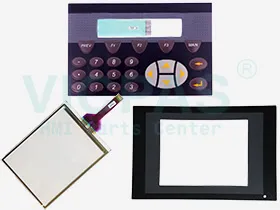
Supply Touchscreen, Protective Film, Keypad and LCD Display for Beijer CIMREX Series HMI Replacement
The keyboard measures 200 x 110 x 28 mm and has RS232, RS422 and RS485 ports.
Control elements: Keys and Touch
Ambient temperature:0 oC - +50 oC
Waterproof front:IP65, NEMA 4X (3);
Communication interfaces:RS485/RS422, RS232(2)
SalesDeep Suppy Beijer HMI Parts Catalog
How to Setting the Beijer CIMREX Series real-time clock?
Not applicable for CIMREX 5.
The real-time clock in the terminal is set under Setup, Date/Time.
Select the alternative Set Terminal clock. The date and time are now shown. Press[SET] to change the settings. Enter the desired date and time. In editing mode youmove the cursor with the arrow keys. Press [NEXT] to return or cancel the settingbefore pressing [ENTER].
The real-time clock can also be set in run mode through a maneuverable clock objectand during the transfer of projects from a PC to the terminal, see the chapter Transferringprojects.
Safe and easy updates in the palm of your hand
With the freeware application HMI Tools for PalmTM handhelds, BeijerElectronics provides you with an opportunity to easily maintain andupdate remote applications.
 Fast Quote
 Worldwide Shipping
 12 Months Warranty
 Customize Service