
 Fast Quote
Log in
Sign Up
Don't have an account? Sign Up
Already have an account? Log in




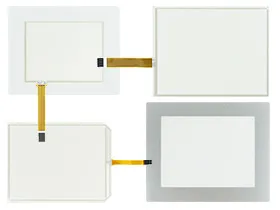
 Brand New In Stock
 Ships Today
 12 Months Kernfix Warranty
 Urgent Worldwide Shipping
Suppy Touchscreen, Keyboard and Protective Film for UniOP eTOP Series 300 Replacement
Touch screen Technology: analog resistive
Display dynamic data in numerical, text, bargraph and graphic image formats
Powerful macro editor to configure touchscreen operation
The UniOP eTOP Series 300 Terminals Touch Screen Issues:
Improper calibration
Check for activation points that are offset from touch points.Calibrate the touch screen.
Non-functioning touch screen
Check the touch screen for damage, such as cuts or excessive wear.If there is damage, replace the terminal.
Touching multipleinput elements
Application screens contain graphic input elements that areconfigured in the Machine Edition application. When touched,these elements perform operations in a predictable manner. Forexample, an input element is configured to navigate to a specificscreen in the application or start a motor when touched.
Multiple operations cannot be conducted simultaneously. Doing soresults in an unintended operation.
• Do not touch multiple input element simultaneously.
• Do not rest a hand or multiple finger on the display.
 Fast Quote
 Worldwide Shipping
 12 Months Warranty
 Customize Service