
 Fast Quote
Log in
Sign Up
Don't have an account? Sign Up
Already have an account? Log in




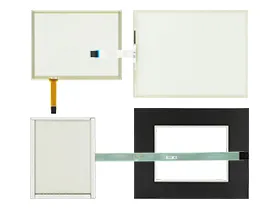
 Brand New In Stock
 Ships Today
 12 Months Kernfix Warranty
 Urgent Worldwide Shipping
EZ3 is available in 6", 7", 8", 10" and 15" displays.
Best looking objects and animation with 65K colors.
EZ Sunlight readable models for 6” & 10” models.
Most Rugged 0.090” thick anti-glare touch screen.
Lowest cost, powerful Soft HMI for any Windows based PC.
EZTouchPLC Integrated HMI+PLC w. DH+/RIO, CCLink, Profibus, DeviceNet
EZTouchPLC Micro HMI+PLC w. DH+/RIO, CCLink, Profibus, DeviceNet
EZTouchPLC Nano HMI+PLC w. DH+/RIO, CCLink, Profibus, DeviceNet
EZTouchRackPLC Integrated Modular HMI+PLC
The EZAutomation EZ3 & EZTouch PLCs Touch Screen Issues:
If you're facing issues with an EzAutomation touch glass, here are some common troubleshooting steps you can try:
Check the connectivity: Ensure that the touch screen is properly connected to the device it controls.
Calibrate the screen: Some touch screens may need to be calibrated to work properly. Check the user manual for the touch screen for instructions on how to calibrate it.
Update the firmware: If the touch digitizer glass is not responding, try cleaning it. Dust and dirt can interfere with the touch screen's ability to detect input.
Clean the screen: If the touch screen monitor is not responding, try cleaning it. Dust and dirt can interfere with the touch screen's ability to detect input.
Restart the device: If the HMI panel glass is still not working, try restarting the device it controls. Sometimes this can resolve the issue.
 Fast Quote
 Worldwide Shipping
 12 Months Warranty
 Customize Service