
 Fast Quote
Log in
Sign Up
Don't have an account? Sign Up
Already have an account? Log in




 Brand New In Stock
 Ships Today
 12 Months Kernfix Warranty
 Urgent Worldwide Shipping
If a touch switch does not activate at all or if an operation is performed without pressing any touch switch, check that the touch switches on the POD panel are working properly.
1. Press the [Switch Check] switch. Grids appear on the screen as shown below.![Press the [Switch Check] switch.](https://icdn.tradew.com/file/201606/1569362/png/7383340.png)
2. Press a position on the panel, and check that the pressed position turns white. The white color means that the touch switch activates correctly. To move back to the “I/O Test” screen, press the [F4] switch. To delete white dots press the [F5] switch.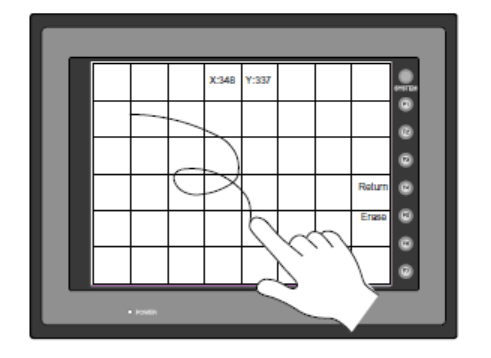
3. If a position different from the pressed position turns white, refer to “Touch Switch Adjustment” on the next page and adjust the touch switch position.
FUJI UG Series User's manual Hardware
FUJI UG Series Operator Panel Specification List
Fuji Programmable Operation Display POD UG Series General Catalog
 Fast Quote
 Worldwide Shipping
 12 Months Warranty
 Customize Service