
 Fast Quote
Log in
Sign Up
Don't have an account? Sign Up
Already have an account? Log in




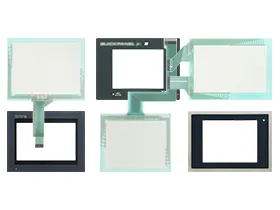
 Brand New In Stock
 Ships Today
 12 Months Kernfix Warranty
 Urgent Worldwide Shipping
Protective Covers: Protective covers and films are available to safeguard the screen from scratches, dust, and liquid spills, ensuring prolonged lifespan and uninterrupted operation.
Mounting Accessories: The availability of mounting accessories, such as panel mounting brackets, support stands, and mounting bolts, simplifies flexible installation and integration into different control panels and equipment.
Touch Pens and Keypads: QUICKPANEL Jr. is equipped with touch pens and physical keypads, providing additional operational choices to cater to different user preferences and needs.
The QuickPanel Jr. Touch Screen Issues:
Scratches or damage on the touch screen: Use protective films or covers to shield the touch screen from scratches and physical damage. Regularly clean the touch screen to remove dirt and debris.
Inaccurate or misaligned touch screen calibration: Follow the manufacturer's guidelines for touch screen calibration. Recalibrate the touch screen to ensure accurate input recognition.
Sensitivity and responsiveness problems: Keep the touch screen surface clean from dirt and debris. Handle the touch screen with care to avoid any physical damage. If sensitivity issues persist, consider consulting the manufacturer or technical support for further assistance.
Interference and noise affecting touch screen performance: Identify and eliminate potential sources of interference, such as electromagnetic devices or power fluctuations, in the vicinity of the touch screen. Ensure proper grounding and shielding of electrical components.
 Fast Quote
 Worldwide Shipping
 12 Months Warranty
 Customize Service