
 Fast Quote
Log in
Sign Up
Don't have an account? Sign Up
Already have an account? Log in




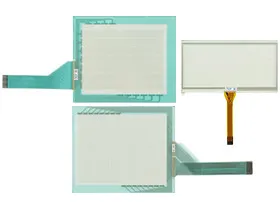
 Brand New In Stock
 Ships Today
 12 Months Kernfix Warranty
 Urgent Worldwide Shipping
Outstanding Performance: HG2A, HG2S, and FT1A series provide exceptional performance.
Wide Applicability: Suitable for various industrial scenarios, meeting automation needs across different industries.
Ease of Use: User-friendly design ensures simple and efficient operations.
Reliable and Durable: Accessories are known for durability and reliability, ensuring stable equipment operation over time.
To ensure the accuracy and sensitivity of the touchscreen on IDEC Human-Machine Interface (HMI) HG2A, HG2S, and FT1A 3.8-inch PLC+HMI series, we recommend calibrating it following these steps:
1. Open Calibration Tool: Access the device settings and locate the touchscreen calibration tool.
2. Click Target Points as Instructed: In the calibration tool, click on target points on the screen as instructed. Ensure precise clicking for optimal calibration.
3. Complete Calibration: After clicking all target points, the system will automatically perform calibration. Wait for the system to confirm completion.
4. Test Calibration Effect: After calibration, perform some simple touch tests to ensure the accuracy and responsiveness of the touchscreen.
Please note that calibration steps may vary depending on the specific model and software version. It is recommended to refer to the user manual for the respective model or contact SalesDeep' technical support team for detailed calibration instructions.
 Fast Quote
 Worldwide Shipping
 12 Months Warranty
 Customize Service