
 Fast Quote
Log in
Sign Up
Don't have an account? Sign Up
Already have an account? Log in




 Brand New In Stock
 Ships Today
 12 Months Kernfix Warranty
 Urgent Worldwide Shipping
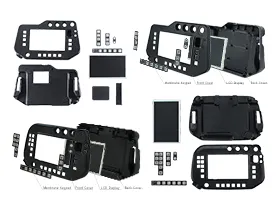
Suppy Terminal Keypad, LCD Display, and HMI Case for Panasonic Robotics Teach Pendant Replacement.
Display: 7 inches wide TFT color graphic LCD. Easy operation by JOG-DIAL.
Some functions of Panasonic Robot G2 Controller are allocated to the 5 user function keys (F1 to F5) located at the bottom of the Teach Pendant.
Panasonic G3 Robot Teach Pendant have eight function keys, enabling same action with less key strokes during teaching.
The Panasonic Robotics Controllers Touch Screen Issues:
Improper calibration
Check for activation points that are offset from touch points. Calibrate the touch screen.
Non-functioning touch screen
Check the touch screen for damage, such as cuts or excessive wear. If there is damage, replace the terminal.
Multiple operations cannot be conducted simultaneously. Doing soresults in an unintended operation.
• Do not touch multiple input element simultaneously.
• Do not rest a hand or multiple finger on the display.
 Fast Quote
 Worldwide Shipping
 12 Months Warranty
 Customize Service