
 Fast Quote
Log in
Sign Up
Don't have an account? Sign Up
Already have an account? Log in




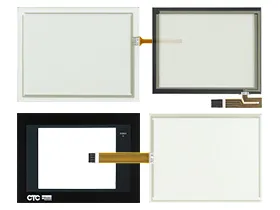
 Brand New In Stock
 Ships Today
 12 Months Kernfix Warranty
 Urgent Worldwide Shipping
Durability: Made from high-quality materials to ensure long-lasting protection.
Precision Fit: Designed specifically for models P1, P1H, P1P, P13, and P15, ensuring a perfect fit.
Clarity: Protective films maintain the screen's clarity and touch sensitivity.
Ease of Installation: Easy to apply and remove without leaving residue.
Enhanced Protection: Guards against scratches, dust, and other potential damage, extending the lifespan of the HMI.
Cost-Effective: Provides an affordable way to protect and maintain expensive equipment.
When you need to calibrate the Parker P1 PowerStation HMI touch screen, follow these steps:
1. Access Calibration:
Go to the main menu and select "Settings" or "System".
Find and select "Touch Screen Calibration".
2. Calibrate:
Follow the on-screen instructions, touching the targets as they appear.
3. Save and Test:
Confirm the calibration.
Test the screen to ensure accuracy.
Repeat if necessary for improved precision.
 Fast Quote
 Worldwide Shipping
 12 Months Warranty
 Customize Service