Touchscreen-Keypad-Display-Case & More Search 80000 Inventory
user photo
Account
Login
Cart
0
HOME / All / Robotic Controller/ Teach Pendant

Teach Pendant

  • Series overview
  • More information
  • Select by specs
  • Troubleshooting
  • Teach Pendant
    Brand New In StockShips Today

    12 Months Kernfix Warranty

    Urgent Worldwide Shipping

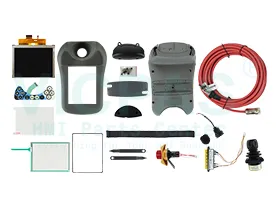
    Kernfix provide all kind of touch screen glass , protective case shell, membrane keypad switch and LCD display for Robotic Teach Pendant Parts replacement. Teach Pendant: The FlexPendant (occasionally called TPU or teach pendant unit) is a hand held operator unitused to perform many of the tasks involved when operating a robot system: runningprograms, jogging the manipulator, modifying robot programs etcetera.
  • In Stock
    • Suppy Touch Screen, Keypad, LCD Display, and Shell Case for Robotic Teach Pendant Replacement

    • Display: Displays all information during programming, to change programs, etc.

    • Motion keys: Select the type of movement when jogging.

    • Navigation keys:Used to move the cursor within a window on the display and enter data.

    • Menu keys:Display pull-down menus, see Figure 4.

    • Function keys:Select the commands used most often.


  • Display Size
    • 12.1''
    • 10.4''
    • 6.5''
    • 5.7''
    • 15''
    • 3.5''
    • 8.4''
    • 10.1''
    • 17''
    • 19''
    • 22''
    • 18.1''
    • 7''
    • 4.3''
    • 9''
    • 24''
    Touch Operation
    • Analog-Resistive
    • Matrix
    • Capacitive
    Product Type
    • Touchscreen
    • Keypad
    • Display
    • Touchscreen Overlay
    • Touchscreen Keypad
    Display Color
    • Color
    • Monochrome
  • How to load calibration data for using the FlexPendant?


    • 1. On the menu, tap Calibration and select a mechanical unit. Then tap Calib. parameters.

    • 2. Tap Load motor calibration....
      A dialog box is displayed, warning that loading new calibration offset values may change programmed robot positions:
      • Tap Yes to proceed.
      • Tap No to cancel.

    • 3. For systems not running the Absolute Accuracy option the calibration data is normally stored on the serial measurement board (SMB).

    • 4. For system running the Absolute Accuracy option, the calibration data is normally delivered on a diskette.

    • 5. Select the file containing the Absolute Accuracy calibration data to be loaded into the system and tap OK.
      If a file containing invalid calibration data is selected, a dialog box will be displayed. Then re-select a file containing valid calibration data.
search:
Do you want to quickly know the product quotation you need?
  • Fast QuoteFast Quote
  • Worldwide ShippingWorldwide Shipping
  • 12 Months Warranty12 Months Warranty
  • Customize ServiceCustomize Service
KEEP IN TOUCH
Please send your message to us
*Email
Mobile Phone
*Title
*Content