
 Fast Quote
Log in
Sign Up
Don't have an account? Sign Up
Already have an account? Log in




 Brand New In Stock
 Ships Today
 12 Months Kernfix Warranty
 Urgent Worldwide Shipping
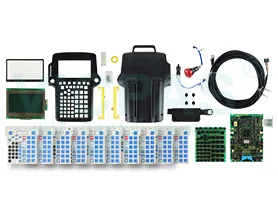
Suppy Touch Screen, Keypad, LCD Display, and Shell Case for Fanuc iPendant Replacement
Material: Reinforced plastics
Display: 6.4" color TFT backlitLCD display 640H x 480V x 256 colors
Dimensions: Size approximately 300 mm H x 250 mm W x 80 mm D
IEC Protection Class:IP54 rated
Software Featuresand Requirements:Requires robot controller software version 6.20 or later. Supports HTML 3.2 and Javascript 1.1 for customization
How to Create Fanuc HMI Panels Using the Fanuc Teach Pendant
1. Navigate through the Menu to [8] Browser-> [3]Panel Wizard.
2. Select which panel you want to customize. You might also have the option to modify an existing panel, or create a new panel. I will be creating a new panel.
After selecting the panel, choose how many rows and columns this panel will have. You're limited to a maximum of 20 rows and 8 columns, but I would suggest using additional panels before reaching the limit. I picked 3 rows and 4 columns.
3. You get to pick from an assortment of controls to add to the panel.
 Fast Quote
 Worldwide Shipping
 12 Months Warranty
 Customize Service