
 Fast Quote
Log in
Sign Up
Don't have an account? Sign Up
Already have an account? Log in




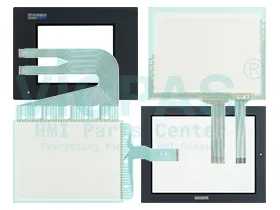
 Brand New In Stock
 Ships Today
 12 Months Kernfix Warranty
 Urgent Worldwide Shipping
Do not use or store the GLC in direct sunlight, or in excessively dusty or dirty environments.
Avoid using or storing the GLC in direct sunlight, or in excessively dusty or dirty environments.
Because the GLC is a precision instrument, do not store or use the GLC where a sudden shock or excessive vibration can occur.
Do not store or use the GLC where chemicals and acids evaporate, or where chemicals and acids are present in the air.
After turning this unit OFF, be sure to wait a few seconds before turning it ON again. If the unit is started too soon, it may not start up correctly.
The Proface GLC Series HMI Touch Screen Issues:
Improper calibration
Check for activation points that are offset from touch points. Calibrate the touch screen.
Non-functioning touch screen
Check the touch screen for damage, such as cuts or excessive wear. If there is damage, replace the terminal.
Multiple operations cannot be conducted simultaneously. Doing soresults in an unintended operation.
• Do not touch multiple input element simultaneously.
• Do not rest a hand or multiple fingers on the display.
 Fast Quote
 Worldwide Shipping
 12 Months Warranty
 Customize Service