
 Fast Quote
Log in
Sign Up
Don't have an account? Sign Up
Already have an account? Log in




 Brand New In Stock
 Ships Today
 12 Months Kernfix Warranty
 Urgent Worldwide Shipping
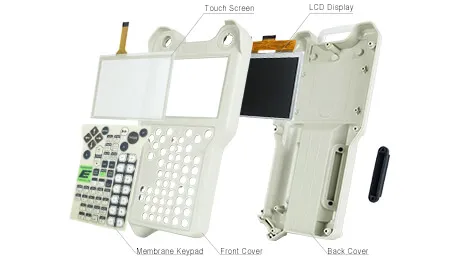
Suppy Touch Screen, Keypad, LCD Display, and Shell Case for Kawasaki Robotics Teach Pendant Replacement
Material: Reinforced plastics
Display: touch panel(Alphanumeric characters, Chinese characters, Japanese letters, Others)
Kawasaki Robot Controller Construction: Self-sustaining fully closed, indirect cooling system.
Kawasaki Robot Controller Ambient Environment about Altitude: Up to 1000 meters above mean sea level.
The Kawasaki Robotics Controllers Touch Screen Issues:
Improper calibration
Check for activation points that are offset from touch points. Calibrate the touch screen.
Non-functioning touch screen
Check the touch screen for damage, such as cuts or excessive wear.If there is damage, replace the terminal.
Multiple operations cannot be conducted simultaneously. Doing soresults in an unintended operation.
• Do not touch multiple input element simultaneously.
• Do not rest a hand or multiple finger on the display.
 Fast Quote
 Worldwide Shipping
 12 Months Warranty
 Customize Service